📦 Free worldwide shipping for orders over US$149 | No lmport Tax 🚚
10% off entire order | Code: TESERY
⭐️⭐️⭐️⭐️⭐️ Tesery.com serves more than 150,000+ Tesla owners worldwide!
Tesery - Premium Tesla Accessories Shop
Cart 0
  • Model Y Juniper
  • Model 3 Highland
  • Model Y
    • Exterior
      • Exterior Carbon
      • Roof Rack
      • Wheel Accessories
      • Mudguards
    • Sun Shade
      • Car Cover
  • Model 3
    • Interior
      • Floor Mats
    • Exterior
      • Roof Rack
      • Wheel Accessories
  • Cybertruck
My Account
Log in Register
Albania (ALL L)
Algeria (DZD د.ج)
Andorra (EUR €)
Angola (USD $)
Anguilla (XCD $)
Antigua & Barbuda (XCD $)
Argentina (USD $)
Armenia (AMD դր.)
Aruba (AWG ƒ)
Australia (AUD $)
Austria (EUR €)
Azerbaijan (AZN ₼)
Bahamas (BSD $)
Bahrain (USD $)
Barbados (BBD $)
Belarus (USD $)
Belgium (EUR €)
Belize (BZD $)
Benin (XOF Fr)
Bhutan (USD $)
Bosnia & Herzegovina (BAM КМ)
Botswana (BWP P)
Brazil (USD $)
Brunei (BND $)
Bulgaria (BGN лв.)
Burkina Faso (XOF Fr)
Burundi (BIF Fr)
Canada (CAD $)
Cayman Islands (KYD $)
Chad (XAF CFA)
Chile (USD $)
Christmas Island (AUD $)
Colombia (USD $)
Comoros (KMF Fr)
Croatia (EUR €)
Cyprus (EUR €)
Czechia (CZK Kč)
Denmark (DKK kr.)
Egypt (EGP ج.م)
Estonia (EUR €)
Ethiopia (ETB Br)
Finland (EUR €)
France (EUR €)
Germany (EUR €)
Greece (EUR €)
Greenland (DKK kr.)
Grenada (XCD $)
Guinea (GNF Fr)
Honduras (HNL L)
Hong Kong SAR (HKD $)
Hungary (HUF Ft)
Iceland (ISK kr)
India (INR ₹)
Iraq (USD $)
Ireland (EUR €)
Israel (ILS ₪)
Italy (EUR €)
Jamaica (JMD $)
Japan (JPY ¥)
Jordan (USD $)
Kazakhstan (KZT ₸)
Kosovo (EUR €)
Kuwait (USD $)
Kyrgyzstan (KGS som)
Laos (LAK ₭)
Latvia (EUR €)
Lebanon (LBP ل.ل)
Libya (USD $)
Liechtenstein (CHF CHF)
Lithuania (EUR €)
Luxembourg (EUR €)
Macao SAR (MOP P)
Madagascar (USD $)
Malawi (MWK MK)
Malaysia (MYR RM)
Maldives (MVR MVR)
Mali (XOF Fr)
Malta (EUR €)
Martinique (EUR €)
Mauritania (USD $)
Mayotte (EUR €)
Mexico (USD $)
Moldova (MDL L)
Monaco (EUR €)
Mongolia (MNT ₮)
Montenegro (EUR €)
Montserrat (XCD $)
Morocco (MAD د.م.)
Mozambique (USD $)
Namibia (USD $)
Netherlands (EUR €)
New Caledonia (XPF Fr)
New Zealand (NZD $)
Niger (XOF Fr)
Niue (NZD $)
North Macedonia (MKD ден)
Norway (USD $)
Oman (USD $)
Panama (USD $)
Philippines (PHP ₱)
Poland (PLN zł)
Portugal (EUR €)
Qatar (QAR ر.ق)
Romania (RON Lei)
Rwanda (RWF FRw)
Samoa (WST T)
San Marino (EUR €)
Saudi Arabia (SAR ر.س)
Serbia (RSD РСД)
Singapore (SGD $)
Slovakia (EUR €)
Slovenia (EUR €)
Somalia (USD $)
South Africa (USD $)
South Korea (KRW ₩)
South Sudan (USD $)
Spain (EUR €)
Sri Lanka (LKR ₨)
Sudan (USD $)
Sweden (SEK kr)
Switzerland (EUR €)
Taiwan (TWD $)
Tajikistan (TJS ЅМ)
Thailand (THB ฿)
Tunisia (USD $)
Türkiye (TRY ₺)
Turkmenistan (USD $)
U.S. Outlying Islands (USD $)
Ukraine (UAH ₴)
United Arab Emirates (AED د.إ)
United Kingdom (GBP £)
United States (USD $)
Vatican City (EUR €)
Yemen (YER ﷼)
Zimbabwe (USD $)
English
Tesery - Premium Tesla Accessories Shop
  • Model Y Juniper
  • Model 3 Highland
  • Model Y
    • Exterior
      • Exterior Carbon
      • Roof Rack
      • Wheel Accessories
      • Mudguards
    • Sun Shade
      • Car Cover
  • Model 3
    • Interior
      • Floor Mats
    • Exterior
      • Roof Rack
      • Wheel Accessories
  • Cybertruck
Account Cart 0

Search our store

Tesery - Premium Tesla Accessories Shop
Account Cart 0
Popular Searches:
sunshade floor mats yoke steering wheel seat cover carbon fiber spoiler dashboard display carplay
Home Tesla News
Exploring the Features and Functionality of the Tesla Model 3’s Touchscreen - Tesery Official Store
Tesla News

Exploring the Features and Functionality of the Tesla Model 3’s Touchscreen

by TeslaTesery on Feb 02, 2023

The Tesla Model 3 is an innovative and exciting car that is revolutionizing the automotive industry. As any Tesla owner can tell you, the most impressive feature of the Model 3 is its large, easy to use touchscreen. In this blog, we'll be exploring the features and functionality of the Tesla Model 3's touchscreen and how it can revolutionize the way you interact with your car. From controlling various systems and settings in the car, to playing music and accessing your navigation system, the Model 3's touchscreen offers a wealth of features and options for the driver. Let's dive in and explore how the Model 3's touchscreen can make your driving experience smoother and more enjoyable.

Warning: Always pay attention to road and traffic conditions when driving. To minimize driver distraction and ensure the safety of vehicle occupants as well as other road users, avoid using the touchscreen to adjust settings while the vehicle is in motion.

Use the touchscreen to control many features that, in traditional cars, are controlled using physical buttons (for example, adjusting the cabin heating and air conditioning, headlights, etc.). You also use the touchscreen to control media, navigate, use entertainment features, and customize Model 3 to suit your preferences. For hands-free access to common touchscreen controls, use voice commands.

If the touchscreen is unresponsive or demonstrates unusual behavior, you can restart it.

Note: Illustrations are provided to improve conceptual understanding only. Depending on vehicle options, software version, market region and regional and language settings, the details displayed on the screen will differ.
  1. Status bar: This area on the top of the touchscreen displays the time of day, the outside temperature, and the following icons:
    an unlocked lock
    Touch to lock/unlock all doors and trunks.
    4:20 pm
    Your vehicle automatically updates the time. If the time is incorrect, confirm your vehicle has internet and GPS connectivity with the latest software.
    a house with an arrow inside
    Displays on the touchscreen status bar only when Model 3 detects a programmed HomeLink within range, and the touchscreen is not already displaying the HomeLink screen or popup. 
    a half circle with a smaller circle on top of it
    Displays on the touchscreen status bar only when Model 3 is parked. Add, configure (including Valet Mode and Use Easy Entry), or quickly switch driver profiles. Driver profiles can also be accessed from the top of any Controls screen. 
    Circle within a circle
    Available when Model 3 is parked, touch to manually enable or disable Sentry Mode for the current drive cycle. To automatically turn Sentry Mode on (or off) every time you leave your vehicle, enable the setting from Controls > Safety > Sentry Mode. 
    Note: If you turn Sentry Mode on or off from Controls > Sentry Mode, the shortcuts on the vehicle's touchscreen and mobile app will only work for the current drive cycle.
    Note:For some vehicles manufactured after approximately November 1, 2021, the center console USB ports may only support charging devices. Use the USB port inside the glove box for all other functions.
    a circle with upward radiating beams
    Displays when Model 3 is connected to a Wi-Fi network.
    lines increasing in height from left to right
    Displays when Model 3 cellular connectivity is very low or unavailable. Touch this icon for quick access to Wi-Fi settings.
    a yellow person and air bag with the text "PASSENGER AIRBAG OFF"
    Status of the front passenger airbag.
  2. Navigation: Change the orientation of the map, find or navigate to a destination, and change navigation settings.
  3. Car status: This area dynamically displays the current status of Model 3 as you drive, park, open doors, turn lights on, etc. Monitor this area when driving as it displays important information such as driving speed and warning messages. When the car is in Park, you can open the trunks or charge port door. This area also houses shortcuts for Media, tire pressures, and Trip Information.

    When full self-driving is enabled (if equipped), the car status area displays visualizations of the road and your vehicle's surroundings. You can expand/condense the visualization by dragging the car status area from side to side. Expanding the visualization displays more details about the roadway and its surroundings, including road markings, stop lights, and objects (such as trash cans and poles).

  4. Controls: Control various features and customize Model 3 to suit your preferences. The Controls screen appears over the map. Touch an option on the Controls screen to display the various settings and options associated with the chosen option. Swipe to close.
    Information iconWhen an information icon displays beside a specific setting, touch it to display a popup that provides helpful details about the associated setting.
    Note: Many vehicle controls, settings, and preferences (such as climate, media, and navigation) can be adjusted hands-free using voice commands.
  5. Climate controls (driver): Use the left and right arrows to decrease/increase cabin temperature. Touch Split on the popup to display separate controls for the driver and passenger. Touch the temperature icon to customize climate control settings. The passenger climate controls display when temperature controls have been Split to provide separate controls for the driver and passenger.
  6. My Apps: For one-touch access to frequently used apps and controls, you can choose what displays here..
  7. App Launcher: Touch the app launcher to open the app tray. Then touch any app to open it. The app you choose displays on top of the map. To close an app, drag it downward.
  8. Recent App(s): Displays the most recently used app(s). The number of recent apps displayed here depends on how many apps have been added to My Apps. If you add the maximum number of apps to My Apps, only the most recent app displays.
  9. Volume Control: Controls the volume of media player and phone calls . The volume of navigation instructions is controlled separately.

Popup Messages and Vehicle Alerts

Popup messages appear at the bottom of the touchscreen. For example, a seat belt reminder appears if a seat belt is unfastened in an occupied seat, an alert appears to notify you of an incoming phone call, a text message appears (when applicable), and voice commands appear when in use. If applicable, touch options from these popup messages (for example, accept/decline a phone call, choose an option from the headlight menu, etc.). To dismiss a popup message, swipe it downward.

If an alert appears on your vehicle's touchscreen, touch Learn More for more details regarding the alert and how it can be resolved. You can view a list of vehicle alerts and notifications by touching the bell icon at the top of Controls.

Note: Not all alerts provide additional information at this time.

Customizing My Apps

For one-touch access to commonly used apps and controls, you can customize what displays in the My Apps area on the touchscreen's bottom bar:

  1. Enter customization mode by touching and holding any app or control in the My Apps area. If this area is empty, touch the App Launcher.
  2. Simply drag any app or control from the app tray onto the My Apps area in the bottom bar.
Note: Seat heaters selected from the app tray appear next to the temperature, instead of in the My Apps area.
Note: Controls (for example, wipers, defrosters and seat heaters) appear in the app tray only when you enter customization mode by touching and holding an app.
Note: When you've added the maximum number of apps or controls to My Apps, adding an additional app removes the rightmost app.
Note: Remove an app or control from the My Apps area by touching and holding, then touching its associated "X".

Restarting the Touchscreen

You can restart your touchscreen if it is unresponsive or demonstrates unusual behavior.

Warning:Only restart the touchscreen while the vehicle is stopped and in Park. The car status display, safety warnings, backup camera, etc. will not be visible during the restart.
  1. Shift into Park.
  2. Hold down both scroll buttons on the steering wheel until the touchscreen turns black. Pressing the brake pedal while holding down the scroll buttons does not have any impact and is not required.
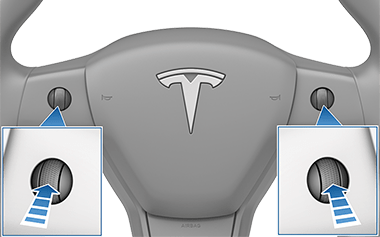
    Steering wheel with zoombox of up arrows pointing at the left and right scroll buttons.
  3. After a few seconds, the Tesla logo appears. Wait approximately 30 seconds for the touchscreen to restart. If the touchscreen is still unresponsive or demonstrating unusual behavior after a few minutes, try power cycling the vehicle (if possible).
Note:Pressing the scroll buttons only restarts the touchscreen. It does not restart any other vehicle component and does not power Model 3 off and on.

Customizing Display and Sound Settings

Touch Controls > Display to adjust display settings to suit your preferences:

  • Appearance: Customize the display to be Dark or Light. When set to Auto, the brightness changes automatically based on ambient lighting conditions.
  • Brightness: Drag the slider to manually control the brightness level. If Display Mode is set to Auto, the touchscreen further adjusts based on both the ambient lighting conditions and your brightness preference. Model 3 remembers your chosen brightness preference and adjusts the touchscreen accordingly.
  • Screen Clean Mode: When enabled, your touchscreen darkens and temporarily disables to facilitate cleaning. Follow the onscreen instructions to exit Screen Clean Mode.
  • Touchscreen Language: Select the language that the touchscreen displays.
    [Note:Model 3 must be in Park to change the language. When you change the language, you experience a brief delay as Model 3 shuts down and restarts the touchscreen.]
  • Voice Recognition Language: Choose the language to be used for voice commands.
  • Voice Navigation Language: Choose the language that the navigation system uses for spoken instructions.
    [Note:For languages that require a download, select the language in the dropdown list to initiate the download (Wi-Fi connection required).]
  • Time: Choose to display time in either 12 or 24 hour format.
  • Energy Display: Choose to display remaining energy and charging units as either a percentage of battery energy remaining, or as an estimate of the distance you can drive.
    [Note:When anticipating when you need to charge, use energy estimate as a general guideline only. Many factors have an impact on energy consumption.]
  • Distance: Choose to display range using miles or kilometers.
  • Temperature: Choose to display temperature using Fahrenheit or Celsius.
  • Tire Pressure: Choose to display tire pressures using BAR or PSI.

In addition to customizing the display, you can enable Joe Mode to reduce the volume of all chimes that are not related to critical safety issues. Touch Controls > Safety > Joe Mode to enable.

Erasing Personal Data

You can erase all personal data (saved addresses, music favorites, HomeLink programming, etc.) and restore all customized settings to their factory defaults. This is useful when transferring ownership of Model 3. Touch Controls > Service > Factory Reset. Before erasing, Model 3 verifies your credentials by prompting you to enter the user name and password associated with your Tesla account.

Tags: How to drive Tesla Model 3?, Model 3 guide
Previous
How to drive Tesla Model 3?
Next
Tesla Autopilot: Exploring the Basics and Benefits of Autonomous Technology

Related Articles

We Tested Tesla Full Self-Driving's Ability to Text and Drive - Tesery Official Store
December 04, 2025

We Tested Tesla Full Self-Driving's Ability to Text and Drive

Tesla CEO Elon Musk Announces Major Full Self-Driving Update: Texting and Driving Capabilities - Tesery Official Store
December 04, 2025

Tesla CEO Elon Musk Announces Major Full Self-Driving Update: Texting and Driving Capabilities

Tesla Semi Receives Major Vote of Confidence from 300-Truck Fleet - Tesery Official Store
December 04, 2025

Tesla Semi Receives Major Vote of Confidence from 300-Truck Fleet

Tesla Extends FSD Supervised Ride-Alongs in Europe by Three Months - Tesery Official Store
December 04, 2025

Tesla Extends FSD Supervised Ride-Alongs in Europe by Three Months

Recent Post

Tesla Screen Protector Installation Guide: Steps & Bubble-Free Tips - Tesery Official Store
Accessories Introduction
Tesla Screen Protector Installation Guide: Steps & Bubble-Free Tips
How to Choose a High-Quality Screen Protector for Your Tesla - Tesery Official Store
Accessories Introduction
How to Choose a High-Quality Screen Protector for Your Tesla
Tesla Storage Solutions: A Guide to Frunk, Center Console, and Door Storage Bins - Tesery Official Store
Accessories Introduction
Tesla Storage Solutions: A Guide to Frunk, Center Console, and Door Storage Bins
Storage Organizer Comparison & Buying Guide for Tesla - Tesery Official Store
Accessories Introduction
Storage Organizer Comparison & Buying Guide for Tesla
Foldable MagSafe Mounts vs. Traditional Dashboard Mounts: A Comparative Analysis - Tesery Official Store
Accessories Introduction
Foldable MagSafe Mounts vs. Traditional Dashboard Mounts: A Comparative Analysis
In-Depth EV Accessory Review: A Case Study on Phone Mounts for Mainstream Models - Tesery Official Store
Accessories Introduction
In-Depth EV Accessory Review: A Case Study on Phone Mounts for Mainstream Models
The Ultimate Guide to Tesla Model Y Roof Racks: Installation, Range, and How to Choose the Best One - Tesery Official Store
roof rack
The Ultimate Guide to Tesla Model Y Roof Racks: Installation, Range, and How to Choose the Best One
Beyond Tesla: How Adapters Are Revolutionizing EV Charging Access - Tesery Official Store
Accessories Introduction
Beyond Tesla: How Adapters Are Revolutionizing EV Charging Access
Tesla Model Y Floor Mats FAQ: What to Know Before You Buy! - Tesery Official Store
Tesla Model Y Floor Mats FAQ: What to Know Before You Buy!
Tesla Mud Flaps & Splash Guards: Ultimate Protection for Model 3/Y/S/X - Tesery Official Store
Accessories Introduction
Tesla Mud Flaps & Splash Guards: Ultimate Protection for Model 3/Y/S/X
Unlocking Hidden Potential: A Deep Dive into the Tesla Model 3 Audio System - Tesery Official Store
Accessories Introduction
Unlocking Hidden Potential: A Deep Dive into the Tesla Model 3 Audio System
Important Shipping Notice for Our Valued US Customers

Featured collection

Shop More >>
19" /20" Wheel Brake Caliper Cover For Tesla Model Y 2020-2024 - Tesery Official Store
-48%
Sold Out

TESERY 19" /20" Wheel Brake Caliper Cover For Tesla Model Y 2020-2026

Regular price $139.00 USD
Sale price $139.00 USD Regular price $270.00 USD
Unit price
/
⚠️ Important Compatibility Note: Not compatible with Model Y Berlin version. Confirm your front caliper...
TESERY Model 3 Highland & Model Y Juniper Yoke Plaid Steering Wheel - Tesery Official Store
-29%
Sold Out

TESERY Model 3 Highland / Model Y Juniper Yoke Plaid Steering Wheel

Regular price $289.00 USD
Sale price $289.00 USD Regular price $409.00 USD
Unit price
/
Note We support individual customization, you can make a note when you place order or...
Performance Style Dry Carbon Fiber Spoiler for Model Y Juniper 2025+ | TESERY
-32%
Sold Out

Performance Style Dry Carbon Fiber Spoiler for Model Y Juniper 2025+ | TESERY

Regular price From $222.99 USD
Sale price From $222.99 USD Regular price $329.00 USD
Unit price
/
Product Specifications Compatibility: Tesla Model Y Juniper 2025 - Present Material: 100% Genuine Carbon Fiber...
ABS Front Lip Spoiler for Tesla Model Y Juniper - Tesery Official Store
-32%
Sold Out

ABS Front Lip Spoiler for Model Y Juniper | TESERY

Regular price $169.00 USD
Sale price $169.00 USD Regular price $249.00 USD
Unit price
/
Enhance the style and performance of your Tesla Model Y Juniper with our ABS Front...
LED Logo Tesla Puddle Lights 2pcs/4pcs for Model 3/Y/S/X - Tesery Official Store
Sold Out

LED Logo Tesla Puddle Lights for Model 3 / Y / S / X

Regular price From $19.99 USD
Sale price From $19.99 USD Regular price $19.99 USD
Unit price
/
LED Logo Tesla Puddle Lights for Model 3 Highland / Y / S / X...
Projection Lights for Tesla Model Y - Tesery Official Store
-15%
Sold Out

Projection Lights for Model Y / 3 | TESERY

Regular price From $55.00 USD
Sale price From $55.00 USD Regular price $65.00 USD
Unit price
/
Model Y Projection Lights present a high-definition Tesla wordmark onto the ground every time you...
TESERY 8 Inch 4G Android Rear Entertainment Screen Display for Tesla Model Y / 3 - Tesery Official Store
-54%
Sold Out

TESERY 8 Inch 4G Android Rear Entertainment Screen Display for Tesla Model Y / 3

Regular price From $319.00 USD
Sale price From $319.00 USD Regular price $699.00 USD
Unit price
/
For Tesla Model 3 (2017–2023) & Model Y (2020–2024) Tesla Rear Entertainment System Screen Display...
TESERY Roof Rack for Tesla Model 3 Highland / Model Y (Set of 2) - Tesery Official Store
Sold Out

TESERY Roof Rack for Tesla Model 3 Highland / Model Y (Set of 2)

Regular price $269.00 USD
Sale price $269.00 USD Regular price
Unit price
/
Tesla Roof Rack Installation and Review Explore a lifestyle on the roof of your Tesla!...
Non-Slip Accelerator Brake Pedal Cover for Tesla Model 3 Model Y 2017-2024 - Tesery Official Store
-40%
Sold Out

TESERY Performance Brake Pedal Cover for Model 3 / Y

Regular price $17.99 USD
Sale price $17.99 USD Regular price $29.99 USD
Unit price
/
Non-Slip Accelerator Brake Pedal Cover  for Tesla Model 3 Model Y 2017-On An integrated application...
Mud Flaps Splash Guards for Tesla Model 3 2017-2023.10 & Model Y 2017-2024 (Set of Four) - Tesery Official Store
-44%
Sold Out

Mud Flaps Splash Guards for Tesla Model 3 / Y

Regular price From $26.99 USD
Sale price From $26.99 USD Regular price $49.00 USD
Unit price
/
How to Install Tesla Model 3 / Y Mud Flaps Splash Guards Installation Instructions :Click...
TESERY Logo Cover Front Badge Rear Letters Emblem for Tesla Model 3 highland / Y - Real Carbon Fiber Exterior - Tesery Official Store
-13%
Sold Out

TESERY Logo Cover Front Badge Rear Letters Emblem for Tesla Model 3 / Y - Real Carbon Fiber Exterior

Regular price $39.99 USD
Sale price $39.99 USD Regular price $45.99 USD
Unit price
/
Upgrade Exterior with Tesla Carbon Fiber Accessories
Key Ring for Tesla Model 3 / Y - Tesery Official Store
-62%
Sold Out

TESERY Smart Ring Key for Tesla Model 3 / Y / S / X / Cybertruck

Regular price From $79.00 USD
Sale price From $79.00 USD Regular price $209.99 USD
Unit price
/
Applicable Car Model Model 3 2017-Present Model 3 Highland 2024-Present Model Y 2020-2024 Model Y...

Over 150,000+ Tesla Owners Worldwide Choose Us

Committed to delivering premium products and exceptional service to Tesla owners worldwide.
  • Free Shipping

    Free Shipping

    Free worldwide shipping over $149
  • Service Excellence

    Service Excellence

    Exclusive 1-to-1 customer support
  • Secure Payment

    Secure Payment

    100% secure payment processing
  • Easy Returns

    Easy Returns

    30-day return policy on all items (Customized products excluded)
  • Quality Guarantee

    Quality Guarantee

    Premium quality products guaranteed
  • 5% Points Back

    5% Points Back

    Earn 5% in points on every dollar spent.
  • Manufacturer Direct

    Manufacturer Direct

    Cut Out The Middleman
  • One-Stop Shop

    One-Stop Shop

    Best prices, complete selection.

About us

  • About us
  • Beware of Fraudulent Websites
  • Climate Commitment
  • Contact us
  • Complaints & Suggestions
  • Coupons and Discounts
  • Track order
  • Tesla News

Policies

  • Payment Methods
  • Privacy policy
  • Refund policy
  • Shipping policy
  • Terms of service
  • Points Policy
  • Warranty Policy

Programs

  • Affiliate Program
  • Become a partner
  • GovX
  • Gift List
  • Partnerships & Installation Shops
  • Member Program
  • Refer and Earn
  • Request for review

Service

  • Become An Installation Partner
  • Customer Reviews
  • UGC Rebates
  • Use/Earn Points
  • Tesery & Friend
  • Influencer Reviews
  • Retailer Partnership

Join the Tesery Community

Subscribe for early access to new products, exclusive discounts, upgrade guides, and special offers.

© 2021-2025 TESERY. All Rights Reserved.
AED
ALL
AMD
AUD
AWG
AZN
BAM
BBD
BGN
BIF
BND
BSD
BWP
BZD
CAD
CHF
CZK
DKK
DZD
EGP
ETB
EUR
GBP
GNF
HKD
HNL
HUF
ILS
INR
ISK
JMD
JPY
KGS
KMF
KRW
KYD
KZT
LAK
LBP
LKR
MAD
MDL
MKD
MNT
MOP
MVR
MWK
MYR
NZD
PHP
PLN
QAR
RON
RSD
RWF
SAR
SEK
SGD
THB
TJS
TRY
TWD
UAH
USD
WST
XAF
XCD
XOF
XPF
YER
English
Payment options:
  • American Express
  • Apple Pay
  • Bancontact
  • Diners Club
  • Discover
  • Google Pay
  • iDEAL
  • Mastercard
  • Shop Pay
  • Visa
Cart 0

Shopping Cart

Your cart is currently empty.
Add note for seller
Add a discount code
Subtotal $0.00 USD
  •  
One or more of the items in your cart is a recurring or deferred purchase. By continuing, I agree to the cancellation policy and authorize you to charge my payment method at the prices, frequency and dates listed on this page until my order is fulfilled or I cancel, if permitted.
View Cart