📦 Free worldwide shipping for orders over US$149 | No import Tax 🚚
⭐️⭐️⭐️⭐️⭐️ Tesery.com serves more than 230,000+ Tesla owners worldwide!
Tesery - Premium Tesla Accessories Shop
Cart 0
  • Model Y Juniper
  • Model 3 Highland
  • Model Y
    • Exterior
      • Exterior Carbon
      • Roof Rack
      • Wheel Accessories
      • Mudguards
    • Sun Shade
      • Car Cover
  • Model 3
    • Interior
      • Floor Mats
    • Exterior
      • Roof Rack
      • Wheel Accessories
  • Cybertruck
My Account
Log in Register
Albania (EUR €)
Algeria (USD $)
Andorra (EUR €)
Angola (USD $)
Anguilla (XCD $)
Antigua & Barbuda (XCD $)
Argentina (USD $)
Armenia (AMD դր.)
Aruba (AWG ƒ)
Australia (AUD $)
Austria (EUR €)
Azerbaijan (AZN ₼)
Bahamas (BSD $)
Bahrain (USD $)
Barbados (BBD $)
Belarus (EUR €)
Belgium (EUR €)
Belize (BZD $)
Benin (XOF Fr)
Bhutan (USD $)
Bosnia & Herzegovina (EUR €)
Botswana (BWP P)
Brazil (USD $)
Brunei (BND $)
Bulgaria (EUR €)
Burkina Faso (XOF Fr)
Burundi (BIF Fr)
Canada (CAD $)
Cayman Islands (KYD $)
Chad (XAF CFA)
Chile (USD $)
Christmas Island (AUD $)
Colombia (USD $)
Comoros (KMF Fr)
Croatia (EUR €)
Cyprus (USD $)
Czechia (EUR €)
Denmark (DKK kr.)
Egypt (EGP ج.م)
Estonia (EUR €)
Ethiopia (ETB Br)
Finland (EUR €)
France (EUR €)
Germany (EUR €)
Greece (EUR €)
Greenland (DKK kr.)
Grenada (XCD $)
Guinea (GNF Fr)
Honduras (HNL L)
Hong Kong SAR (HKD $)
Hungary (HUF Ft)
Iceland (EUR €)
India (INR ₹)
Iraq (USD $)
Ireland (USD $)
Israel (USD $)
Italy (EUR €)
Jamaica (JMD $)
Japan (JPY ¥)
Jordan (USD $)
Kazakhstan (KZT ₸)
Kosovo (EUR €)
Kuwait (USD $)
Kyrgyzstan (KGS som)
Laos (LAK ₭)
Latvia (EUR €)
Lebanon (USD $)
Libya (USD $)
Liechtenstein (EUR €)
Lithuania (EUR €)
Luxembourg (EUR €)
Macao SAR (MOP P)
Madagascar (USD $)
Malawi (MWK MK)
Malaysia (USD $)
Maldives (MVR MVR)
Mali (XOF Fr)
Malta (EUR €)
Martinique (EUR €)
Mauritania (USD $)
Mayotte (EUR €)
Mexico (USD $)
Moldova (EUR €)
Monaco (EUR €)
Mongolia (MNT ₮)
Montenegro (EUR €)
Montserrat (XCD $)
Morocco (USD $)
Mozambique (USD $)
Namibia (USD $)
Netherlands (EUR €)
New Caledonia (XPF Fr)
New Zealand (USD $)
Niger (XOF Fr)
Nigeria (NGN ₦)
Niue (NZD $)
North Macedonia (EUR €)
Norway (NOK kr)
Oman (USD $)
Panama (USD $)
Philippines (PHP ₱)
Poland (PLN zł)
Portugal (EUR €)
Qatar (USD $)
Romania (RON Lei)
Rwanda (RWF FRw)
Samoa (WST T)
San Marino (EUR €)
Saudi Arabia (SAR ر.س)
Serbia (EUR €)
Singapore (USD $)
Slovakia (EUR €)
Slovenia (EUR €)
Somalia (USD $)
South Africa (USD $)
South Korea (USD $)
South Sudan (USD $)
Spain (EUR €)
Sri Lanka (USD $)
Sudan (USD $)
Sweden (EUR €)
Switzerland (CHF CHF)
Taiwan (TWD $)
Tajikistan (TJS ЅМ)
Thailand (USD $)
Tunisia (USD $)
Türkiye (TRY ₺)
Turkmenistan (USD $)
U.S. Outlying Islands (USD $)
Ukraine (EUR €)
United Arab Emirates (USD $)
United Kingdom (GBP £)
United States (USD $)
Uruguay (UYU $U)
Uzbekistan (UZS so'm)
Vatican City (EUR €)
Yemen (USD $)
Zimbabwe (USD $)
English
Tesery - Premium Tesla Accessories Shop
  • Model Y Juniper
  • Model 3 Highland
  • Model Y
    • Exterior
      • Exterior Carbon
      • Roof Rack
      • Wheel Accessories
      • Mudguards
    • Sun Shade
      • Car Cover
  • Model 3
    • Interior
      • Floor Mats
    • Exterior
      • Roof Rack
      • Wheel Accessories
  • Cybertruck
Account Cart 0

Search our store

Tesery - Premium Tesla Accessories Shop
Account Cart 0
Popular Searches:
sunshade floor mats yoke steering wheel seat cover carbon fiber spoiler dashboard display carplay
TESERY 2026 EVENT BLACK FRIDAY
EXTRA 5% OFF
Use at checkout
SAVE $50–$150 Selected upgrades · Limited quantities
FREE GIFTS Choose gifts at $79 and $159
2X POINTS Earn double points on eligible orders
SALE ENDS IN
00DAYS : 00HRS : 00MIN : 00SEC
SHOP DEALS
Home Tesla Accessories Guides
Aftermarket display above a Tesla steering wheel showing a front-camera view, with an inset of the camera
Tesla Accessories Guides

How to operate Aftermarket Tesla dashboard?

by JULIET YU on Jan 30, 2023

Developed for instrument, Tesery dashboard display is an integrated machine compatible with the original Tesla vehicle information, Android system, CarPlay interconnection, Bluetooth, forward blind area,navigation, instrument information display, etc. The structure adopts the non-destructive installation mode of private car mold, and the perfect combination with the center control panel is closer to the style of the original large screen.

The operating system of the product is the open Android system, which can be controlled by the keys of the steering wheel or make telephone calls by voice to simplify the operation and avoid driving safety risks, so that you can travel safely while providing entertainment and personalized high-end products.

Impressive Features

1. Android version 4G

This product uses Android version 4G full network, octa-core processor, DDR:2GB/4GB, ROM:32GB/64GB operating system:

Android12.0 with high performance hardware to run more smoothly, built-in wireless CarPlay mobile Internet, Bluetooth, online music,

online video, Autonavi real-time road condition map navigation, voice control, and add the original car information and code watch style display

2. 1920*720 IPS

The appearance adopts the private mode HD 10.25 inch large screen, customized UI interface, adopts the full fit process to avoid dust,

HD resolution 1920*720 IPS full view screen is closer to the original big screen style.

3. Parameters
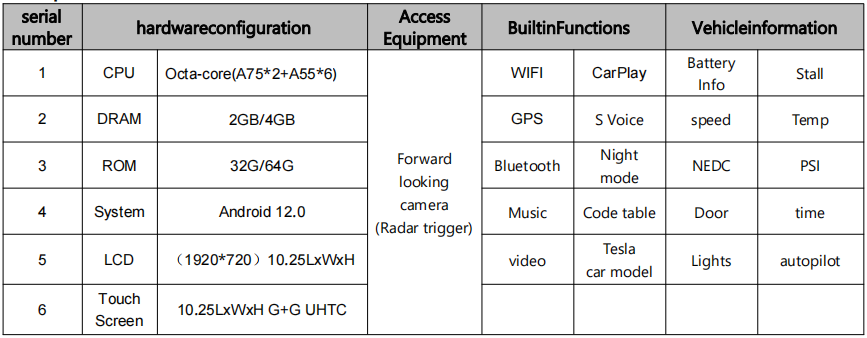
Specification table for the 10.25-inch Android dashboard, including processor, memory, display and connectivity.

4. Maininterface function is introduced

Instrument screen diagram identifying speed, gear, temperature, battery and status indicators.

5. Three modes

The screen display has three modes (full screen, Right split screen, Left split screen) can be selected in "VehicleSettings" - "Other" - "screen display mode", restart the machine after saving the effect.

Left and right split-screen layouts with steering-wheel button instructions.

*Note: When the control function is turned off by the button of cruise control or automatic driving, the button of left push right push is to adjust the following distance with the car in front *

How to Operate the Instrument Panel?

1. Language Setting

car machine into the interface point "vehicle Settings" - "general" - "language choice"

supported languages are as follows: Chinese, English, traditional Chinese,Russian, Korean, French,Spanish, Portuguese, Polish, Dutch
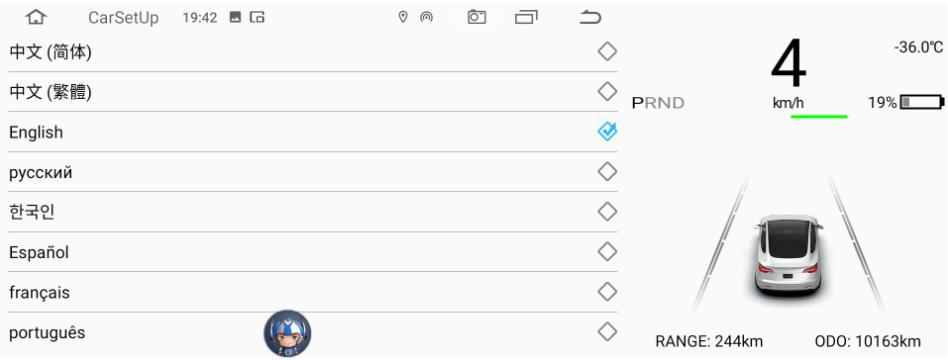
Dashboard language settings listing Chinese, English and other language options.

2.Timing

  • to set the date and time synchronization network (effective) connect the WIFI
  • to set the date and time synchronization navigation (GPS) effectively
  • is adjustable for 12 hours, when the default system 24 hours a day
  • time can be automatic/manual Settings
Date and time settings with network, GPS and time-format controls.

3. Version information view

Vehicle Settings - general - version information

Dashboard information screen listing hardware, Android, system, app and MCU versions.

4.APP software upgrades

  • First turn the U disk into FAT32 format
  • Copy the upgrade package to the root directory of the USB flash drive, as shown in Figure 1 below!
Firmware files shown as a BIN file and a compressed update package.
  • After inserting the USB flash drive into the USB port on the right side of the instrument, the screen will prompt Firmware
  • upgrade - Click Install (check "Clear all memory data" and some navigation data will be lost after formatting). Wait for the
  • machine upgrade for about 3 minutes, the green interface will jump to the English interface after the upgrade is successful,
  • remove the USB flash drive, as shown below!
Firmware installation prompt beside a green update progress screen.

5. Instrument panel with the original car bluetooth connection

  •  Search the original car Bluetooth and find the Bluetooth "BT1036V2.5.2-...." of the instrument machine. Connect by name
  • connection voice will send output through the simulation host
  • When the instrument machine plays sound/video sound can be output through the original car large screen horn

★If not connected with the original car can only navigation sound, instrument built-in small speaker

6. WiFi Connection Manager

  • Start by turning on your phone's hotspot
  • Car machine interface point "vehicle Settings" - "network" search WIFI hotspot connection to connect
  • Shortcut to enter, slipping over the screen long press "WIFI" icon to enter the connection
  • Note to check the WIFI signal strength

7. Scott map function

  • connected wi-fi hotspots or inserted after 4 g card can be real-time navigation
  • open navigation application enter the destination into the navigation or voice navigation
  • navigation to adjust the size of the voice
  • Tap the Sound icon in the upper right corner of the navigation map. A sound will be displayed
  • Size progress bar, adjust the size of the sound progress bar can adjust the size of the sound
  • close map built-in input method.Click the "Head" icon in the upper left corner of the map interface to enter Settings - Other - built-in input can be closed
  • main interface switching three UI
  • steering wheel roller press roller long press left key 3 seconds to switch on the right
  • right click through the steering wheel on the right side of the wheel to choose corresponding UI

8.main interface way right border to replace custom images

  • click right border in can change via USB or change the images in the machine
  • According to return after
  • choose to like the picture right border refresh automatically to the main interface
  • main interface right border quickly switch point under the two custom images with energy recovery
  • suggested the best effect is the square: 218 * 218
  • supported formats: JPG, PNG

9. PPTV

  • click application - video playback - choose the corresponding video files
  • play video can click on the picture in picture in the main interface display or drag the position
  • main interface, click on the picture in picture to enlarge video double-click can return to the video player

10. Bluetooth connection

  • Enable the Bluetooth function of the mobile phone
  • in the machine interface "vehicle Settings" - "bluetooth" scan mobile devices
  • When the phone's Bluetooth device name is scanned, click the device name to connect
  • phone receive pairing code prompts to confirm matching connection

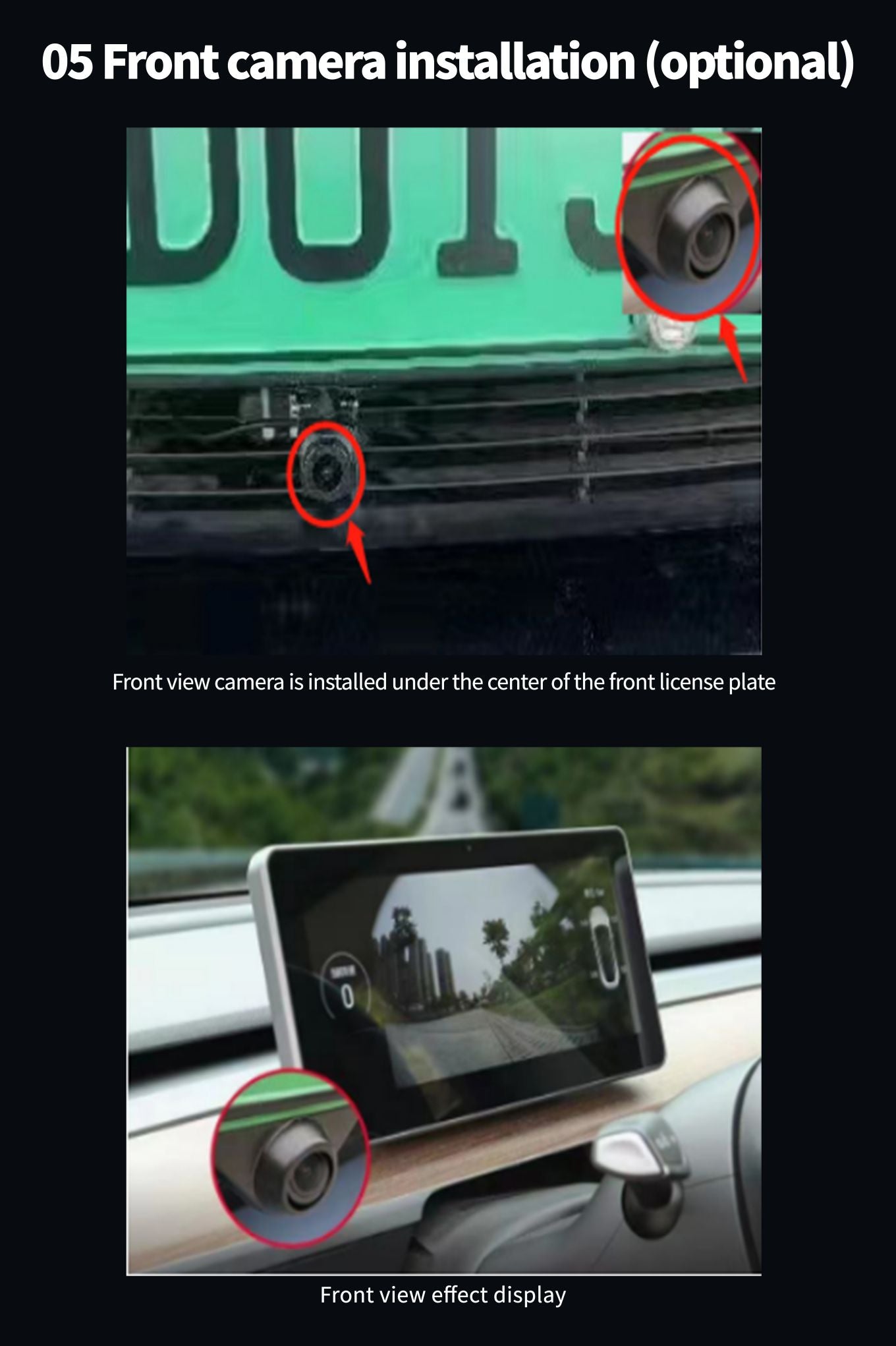
11. HD-FRONT

  • Go to "Vehicle Settings" - "Other" - "Forward view Settings"
  • visual function before open or close
  • when radar is triggered automatically into the top 10 seconds
  • When the front view camera is installed, the front view image can be opened. Without the front view, there is no need to open it.

12. factory settings

  • "vehicle Settings" - "factory Settings" - 6688 "password"
  • can enter the menu set at a lower level

13. navigation application

  • into "vehicle Settings" - "navigation"
  • path can be set up navigation application

14. choose music application

 into "vehicle Settings" - "factory Settings" - "6688" - choose music application

15. boot LOGO Settings

 the image resolution (1920 * 720/24).bmp file copy to U the packing list, and named bootlogo. BMP as shown in the figure

below

 U disk inserted into the screen on the USB port on the right point in turn: vehicle factory Settings - > set (6688) -- - > LOGO

boot choice - > sure wait for set up successfully

 after the success of the set, remove the usb flash drive, machine electricity boot images can still be memory

USB drive folder containing three boot-logo bitmap image files.

16. Change WallPaper

 wallpaper (resolution 1920 * 720/32) first PNG format file copy to U the packing list, and name into which wallpaper *. PNG as

shown in figure

 U disk inserted into the screen on the USB port on the right point in turn: vehicle factory Settings - > set (6688) - > select

wallpaper - > sure wait for set up successfully

USB drive folder containing six wallpaper PNG image files.

17. models color selection

 into "vehicle Settings" - "factory set up 6688" - "models color choice"

 is selected automatically when synchronization original car models

 manual can make models colour (silver/white/red/blue/black)

18. to install the APP

 into the "application" - "document management" - "USB" - find U disk inside needed to install the apk - point Settings - allows

applications from the source of open - points in the top right corner of the back - point - after installing or open

19. Mobile interconnection wireless connection CarPlay

 First connect WIFI or insert 4G card to activate CayPlay

 bluetooth function, open the IPhone into the machine scan bluetooth device name point connection, mobile phone received

the bluetooth pairing request to choose matching (figure 1)

 phone received bounced "allows synchronization" address book "and" personal collection "option allows (figure 2)

 phone received bounced "use CarPlay on-board" choose to use CarPlay vehicle (figure 3), connected (figure 4), the connection

is successful (figure 5)
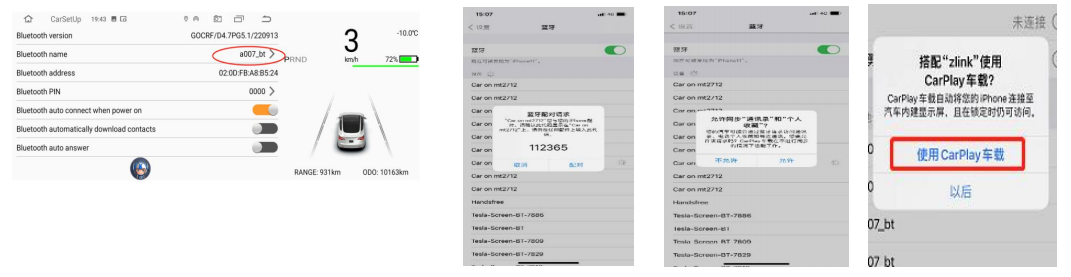
CarPlay pairing sequence showing the dashboard settings and iPhone permission prompts.
CarPlay connection screen beside the connected dashboard app menu.

20. Wired Android auto

Android auto requires a phone that supports Google services and is installed in the Google play store:

After installing the above apps, click on Android Auto, and install the corresponding services and updates according to the prompts.● Android auto Correct operation steps for wired connection

(Phones need to support Google services and have auto software installed)

1.Open zlink software --> 2. Insert Android phone to USB --> 3. The connection success screen is shown

  • Android auto Correct steps for wireless connection

(Phones need to support Google services and have auto software installed)

Android auto wireless connection:Connect the Android phone to the USB OTG interface of the car (only OTG port is supported, other

usb ports are not supported), and the Android auto (mobile phone) interface will be displayed after successful connection

Zlink connection screen beside an Android Auto app menu.

21. Common troubleshooting guide

Troubleshooting table listing dashboard faults, possible causes and suggested solutions.

How to Install the Instrument Panel?

Installation guide contents covering SIM card, trim, Intel and AMD wiring, and optional front camera.
Installation precautions page highlighting power disconnection before installation.
Four illustrated steps for removing the SIM tray, inserting a SIM card and refitting the tray.
Installation photos showing dashboard side-panel removal, trim lifting and passenger-side screw removal.
Intel Atom installation diagram showing connector access, power wiring, bracket and dashboard placement.
AMD installation photos showing the OBD connector, power lead and ground connection.
Dashboard trim being refitted, followed by the installed screen showing CarPlay and instrument displays.
Optional front camera shown beneath the license plate, with its view on the dashboard screen.

    Related Topics: Driving, Tesla Dashboard
    Previous
    Best 10 Gifts for Tesla Owners
    Next
    How to Operate Tesla Model 3 / Y Mini Screen Display ?

    Related Articles

    Tesla TPMS compatibility graphic comparing blue BLE and black RF tire sensors beside a white car.
    September 20, 2026

    Can You Mix BLE and RF TPMS Sensors on One Tesla?

    Tesla TPMS troubleshooting graphic with a blue tire sensor, a warning light and a display showing four tire pressures.
    September 19, 2026

    Tesla TPMS Warning Light On But Tire Pressure Is Fine – What to Do?

    TPMS installation graphic showing a wheel and a blue tire sensor beneath the words Without Removing the Tire.
    September 18, 2026

    How to Install Tesla TPMS Sensors Without Removing the Tire

    Tesla TPMS compatibility graphic showing a blue sensor beside an aftermarket wheel and a white car.
    September 18, 2026

    Tesla TPMS Sensor Compatibility with Aftermarket Wheels

    Leave a Comment

    Your email address will not be published.

    Recent Post

    Tesla Cybertruck inside Texas Gigafactory as production winds down
    ai
    Tesla to Wind Down Cybertruck Production at Texas Plant by 2027
    Starship upper stage descending toward launch tower catch arms at dusk above a coastal pad
    auto-2026-11-06
    Starship Flight 15: Reports of Nov 13 Launch, First Ship Catch
    Tesla Model Y on rainy European cobblestone street with driver-assistance visualization on central touchscreen
    auto-2026-11-06
    Tesla Reportedly Renames Self-Driving Feature and Cuts EU Speed Limit
    EVgo charging station near downtown Chicago with Tesla Supercharger stalls at dusk.
    auto-2026-11-06
    Reports: EVgo Opens First Tesla Supercharger Hardware Site in Chicago
    Unfinished Optimus humanoid robot torso on a workbench with exposed AI chip memory modules
    AI & Robotics
    Reports: Tesla Lowers Optimus AI6 DRAM from 216GB to 144GB
    Tablet with downward red stock chart next to index fund prospectus and EV charging connector on desk.
    auto-2026-11-05
    Tesla Stock Plunge Hits Index Fund Investors, Report Says
    Qualcomm 5G base station tower and Starlink satellite dish at dusk near a Tesla Model 3
    5g
    SpaceX Taps Qualcomm for Starlink Mobile 5G Network in U.S.
    Tesla Model 3 in Seoul with grayed-out FSD option on touchscreen, traffic camera in background
    auto-2026-11-05
    South Korean Consumer Group Accuses Tesla of Misleading FSD Marketing
    Tesla Optimus humanoid robot on factory floor among assembly arms
    ai
    Tesla Optimus 20,000-a-Week Target Reported but Still a Year Away
    Dark storm clouds over SpaceX Starbase in Boca Chica, Texas at dusk
    auto-2026-11-04
    Texas Blue Wave Raises New Political Risk for SpaceX and Musk
    South Korean Tesla owner checking grayed-out Full Self-Driving screen on parked Model Y
    auto-2026-11-04
    South Korean Consumer Group Accuses Tesla of Misleading FSD Marketing
    Tesla Model 3 and Model Y vehicles outside Shanghai factory, cargo ship in background
    auto-2026-11-04
    Tesla China EV Sales Up 10.3%, Reports Split on Monthly Trend

    Featured collection

    Shop More >>
    Four red caliper covers above a black Tesla Model Y with red covers visible behind the wheels.
    Four red caliper covers above a black Tesla Model Y with red covers visible behind the wheels.
    -48%
    Sold Out

    TESERY 19" /20" Wheel Brake Caliper Cover For Tesla Model Y 2020-2026

    Regular price £105.00 GBP
    Sale price £105.00 GBP Regular price £204.00 GBP
    Unit price
    /
    Model Y · 19/20-inch compatible wheels Big-caliper color without replacing the braking system. A four-piece...
    Black open-top yoke steering wheel with side controls and a silver lower spoke, viewed beside two dashboard screens.
    -29%
    Sold Out

    TESERY Model 3 Highland / Model Y Juniper Yoke Plaid Steering Wheel

    Regular price £218.00 GBP
    Sale price £218.00 GBP Regular price £309.00 GBP
    Unit price
    /
    Note We support individual customization, you can make a note when you place order or...
    Close-up of a carbon fiber rear spoiler fitted above the light bar on a dark Model Y Juniper
    Close-up of a carbon fiber rear spoiler fitted above the light bar on a dark Model Y Juniper
    -30%
    Sold Out

    Performance Style Dry Carbon Fiber Spoiler for Model Y Juniper 2025+ | TESERY

    Regular price From £173.00 GBP
    Sale price From £173.00 GBP Regular price £248.00 GBP
    Unit price
    /
    Product Specifications Compatibility: Model Y Juniper 2025+, Model Y Standard 2025+ Material: 100% Genuine Carbon...
    Front-quarter view of a dark Model Y Juniper with a black front lip extending along the lower bumper.
    Front-quarter view of a dark Model Y Juniper with a black front lip extending along the lower bumper.
    -24%
    Sold Out

    ABS Front Lip Spoiler for Model Y Juniper / Model YL | TESERY

    Regular price £113.00 GBP
    Sale price £113.00 GBP Regular price £150.00 GBP
    Unit price
    /
    Exclusive for 2025+ Model Y Juniper Aggressive Stance. Superior Protection. Transform the front end of...
    Four rectangular LED door puddle lights with red leads, above a photo of white Tesla logo projections beneath open doors.
    Four rectangular LED door puddle lights with red leads, above a photo of white Tesla logo projections beneath open doors.
    -20%
    Sold Out

    LED Logo Tesla Puddle Lights for Model 3/Y/S/X | TESERY

    Regular price From £16.00 GBP
    Sale price From £16.00 GBP Regular price £20.00 GBP
    Unit price
    /
    LED Logo Tesla Puddle Lights for Model 3 Highland / Y / S / X...
    Door light projecting the word TESLA onto the ground beside a Model Y door sill
    Door light projecting the word TESLA onto the ground beside a Model Y door sill
    -48%
    Sold Out

    Projection Lights for Model Y / 3 | TESERY

    Regular price From £25.00 GBP
    Sale price From £25.00 GBP Regular price £49.00 GBP
    Unit price
    /
    Premium Ultra-HD Glass Puddle Lights for Tesla Model Y & 3 Elevate your Tesla's entrance...
    Two black curved roof rack crossbars with shaped mounting feet on a white background.
    Two black curved roof rack crossbars with shaped mounting feet on a white background.
    -40%
    Sold Out

    TESERY Roof Rack for Tesla Model 3 Highland / Model Y (Set of 2)

    Regular price £203.00 GBP
    Sale price £203.00 GBP Regular price £339.00 GBP
    Unit price
    /
    Tesla Roof Rack Installation & Show Video Real Influencer Reviews for TESERY Roof Rack Explore...
    Silver brake and accelerator pedal covers with black grip strips installed in a Tesla footwell
    Silver brake and accelerator pedal covers with black grip strips installed in a Tesla footwell
    -39%
    Sold Out

    TESERY Performance Brake Pedal Cover for Model 3 / Y

    Regular price £14.00 GBP
    Sale price £14.00 GBP Regular price £23.00 GBP
    Unit price
    /
    A focused interior upgrade Give everyday pedals a cleaner, performance-inspired finish. Replace the plain visual...
    Four black front and rear mud flaps arranged on a white background.
    Four black front and rear mud flaps arranged on a white background.
    -40%
    Sold Out

    Mud Flaps Splash Guards for Tesla Model 3 / Y

    Regular price £22.00 GBP
    Sale price £22.00 GBP Regular price £37.00 GBP
    Unit price
    /
    Four-piece splash-guard set Keep road spray behind the wheels—not along the rocker panels. Model-specific mud...
    Carbon-pattern T badge and spaced rear TESLA lettering on a white car, shown in two views.
    Carbon-pattern T badge and spaced rear TESLA lettering on a white car, shown in two views.
    -11%
    Sold Out

    TESERY Logo Cover Front Badge Rear Letters Emblem for Tesla Model 3 / Y - Real Carbon Fiber Exterior

    Regular price £31.00 GBP
    Sale price £31.00 GBP Regular price £35.00 GBP
    Unit price
    /
    Upgrade Exterior with Tesla Carbon Fiber Accessories
    Hand wearing a glossy black Tesla smart ring key held close to the exterior door pillar.
    Hand wearing a glossy black Tesla smart ring key held close to the exterior door pillar.
    -35%
    Sold Out

    TESERY Smart Ring Key for Tesla Model 3 / Y / S / X / Cybertruck

    Regular price From £68.00 GBP
    Sale price From £68.00 GBP Regular price £105.00 GBP
    Unit price
    /
    Ultimate Backup Key Don't Let a Dead PhoneLock You Out A backup key, right on...
    Black wireless CarPlay adapter and retail box above a Tesla display showing phone apps alongside vehicle controls.
    Black wireless CarPlay adapter and retail box above a Tesla display showing phone apps alongside vehicle controls.
    -47%
    Sold Out

    Wireless Apple CarPlay Adapter for Tesla | TESERY

    Regular price £58.00 GBP
    Sale price £58.00 GBP Regular price £110.00 GBP
    Unit price
    /
    Wireless CarPlay Adapter for Tesla Model 3 & New Model Y & Model S &...

    Over 230,000+ Tesla Owners Worldwide Choose Us

    Committed to delivering premium products and exceptional service to Tesla owners worldwide.
    • Free Shipping

      Free Shipping

      Free worldwide shipping over $149
    • Service Excellence

      Service Excellence

      Exclusive 1-to-1 customer support
    • Secure Payment

      Secure Payment

      100% secure payment processing
    • Easy Returns

      Easy Returns

      30-day return policy on all items (Customized products excluded)
    • Quality Guarantee

      Quality Guarantee

      Premium quality products guaranteed
    • 5% Points Back

      5% Points Back

      Earn 5% in points on every dollar spent.
    • Manufacturer Direct

      Manufacturer Direct

      Cut Out The Middleman
    • One-Stop Shop

      One-Stop Shop

      Best prices, complete selection.

    About us

    • Beware of Fraudulent Websites
    • Contact us
    • Complaints & Suggestions
    • Coupons and Discounts
    • Track order
    • Tesla News

    Policies

    • Payment Methods
    • Privacy policy
    • Refund policy
    • Rewards Policy
    • Shipping policy
    • Terms of service
    • Points Policy
    • Warranty Policy

    Programs

    • Affiliate Program
    • GovX
    • Gift List
    • Member Program
    • Refer and Earn
    • Request for review

    Service

    • Customer Reviews
    • Creator Reviews
    • Retailer Partnership

    Join the Tesery Community

    Subscribe for early access to new products, exclusive discounts, upgrade guides, and special offers.

    © 2021-2026 TESERY. All Rights Reserved.
    AMD
    AUD
    AWG
    AZN
    BBD
    BIF
    BND
    BSD
    BWP
    BZD
    CAD
    CHF
    DKK
    EGP
    ETB
    EUR
    GBP
    GNF
    HKD
    HNL
    HUF
    INR
    JMD
    JPY
    KGS
    KMF
    KYD
    KZT
    LAK
    MNT
    MOP
    MVR
    MWK
    NGN
    NOK
    NZD
    PHP
    PLN
    RON
    RWF
    SAR
    TJS
    TRY
    TWD
    USD
    UYU
    UZS
    WST
    XAF
    XCD
    XOF
    XPF
    English
    Pay with Ease:
    • AliPay
    • Amazon
    • American Express
    • Apple Pay
    • Bancontact
    • Bizum
    • Diners Club
    • Discover
    • Google Pay
    • iDEAL Wero
    • Mastercard
    • MB WAY
    • Satispay
    • Shop Pay
    • USDC
    • Visa

    Shopping Cart

    Your cart is currently empty.
    Add note for seller
    Add a discount code

    Subtotal £0.00 GBP
    •  
    View Cart